Connect Four Classic Puzzle

Connect Four Classic Puzzle

Publisher
Release Date
Update Time 2026-07-17
Tags Strategy , Puzzle , Board Game , Logic , Family
Rating 4.0
Platform Html5
Advertisement

Reviews

Connect Four Classic Puzzle delivers a polished and enjoyable experience of the timeless board game. The smooth gameplay and colorful visuals make it easy to play for minutes or hours. The adjustable difficulty against the computer provides a good challenge for beginners and experts alike. While it lacks online multiplayer, the local two-player mode is great for family fun. Overall, a solid choice for puzzle fans.

About This Game

Game Introduction

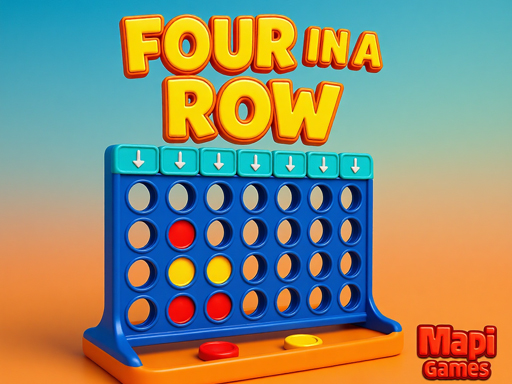
Connect Four Classic Puzzle is a free online board game that brings the timeless challenge of connecting four discs to your screen. Players alternate placing colored discs into a vertical grid, aiming to be the first to form a line of four discs horizontally, vertically, or diagonally. This game offers a pure test of planning and foresight, suitable for players of all ages. The simple rules make it easy to learn, but mastering the strategy requires practice and attention. With options to play against a computer opponent or with a friend locally, the game provides endless opportunities for fun and mental exercise. The bright colors and smooth animations create an engaging experience that encourages repeated play. Whether you are new to this type of game or a seasoned player, Connect Four Classic Puzzle offers a satisfying challenge that sharpens your logical thinking. The game is designed to be accessible on any device with a web browser, making it easy to enjoy a quick match anytime.

How to Play

To begin, choose your game mode: play against the computer or with a friend sitting nearby. Each player selects a color, typically red or yellow. On your turn, click on a column to drop your disc into the grid. The disc will fall to the lowest empty space in that column. The objective is to connect four of your discs in a row before your opponent does. Pay attention to your opponent's moves and try to block their attempts while building your own line. The game ends when a player achieves four in a row or the grid becomes full, resulting in a draw. Strategic thinking is key to success.

Game Features

Connect Four Classic Puzzle includes several features that enhance the playing experience. The game offers multiple difficulty levels when playing against the computer, allowing players to gradually improve their skills. A local two-player mode is available for friendly competition. The visuals are colorful and clear, making it easy to see the discs on the grid. Smooth animations and pleasant sound effects contribute to an enjoyable atmosphere. The game is free to play and requires no download or registration. It works on most modern web browsers and devices, providing convenient access to classic puzzle fun.

Tips for Success

To improve your performance, practice regularly to recognize common patterns and anticipate your opponent's moves. Focus on controlling the center columns of the grid, as they offer more opportunities to create lines. Always watch for potential threats from your opponent and block them early. Try to create multiple threats at once, forcing your opponent to choose which to block. Playing against the computer on higher difficulty settings can help you develop stronger strategic thinking.

✅ Compatibility & Testing

• Desktop (Windows 11, macOS Ventura)
• Mobile (iPhone 14, Samsung Galaxy S23)
• Tablet (iPad Pro, Android tablet)
✅Supported browsers: Chrome, Safari, Edge, Firefox (latest versions)
❌ Not supported: Internet Explorer, older browser versions

System Requirements

OS Windows 7/8/10 64-bit
CPU Core i3 3.3 GHz
Memory 4GB RAM
GPU Intel HD 4000
CPU (Recommended) Core i5 3.5 GHz
Memory (Recommended) 8GB RAM
OS Mac OSX Mojave (10.14.6+)
CPU Core i3 3.3 GHz
Memory 4GB RAM
GPU Intel Iris Pro 5200
CPU (Recommended) Core i5 3.5 GHz
Memory (Recommended) 8GB RAM

Follow Us

Faq

Can I play Connect Four Classic Puzzle on my phone?
Yes, the game is designed to work on mobile devices as well as desktop computers. You can play it directly in your web browser without needing to download any app.
Is there a time limit for each move in Connect Four Classic Puzzle?
The game does not have a built-in time limit for moves. You can take as much time as you need to think about your strategy, making it suitable for relaxed play.
Does Connect Four Classic Puzzle have an undo button?
The game does not include an undo feature. Each move is final, which encourages careful planning and adds to the challenge of the game.
Can I change the color of the discs in Connect Four Classic Puzzle?
The game offers standard red and yellow disc colors for players. Custom color options are not available in this version.
Is there a way to track my win-loss record in Connect Four Classic Puzzle?
The game does not include a built-in score tracker. Each match is independent, so you can focus on the current game without worrying about statistics.
Does Connect Four Classic Puzzle support online multiplayer with other players?
No, the game only offers local two-player mode and play against the computer. There is no online multiplayer feature to play with others over the internet.

Other Similar Games