logo HuntChef Hub
  • Home
  • Skill
  • Action
  • Puzzle
  • About
Login Register
U User ▼
U User
Profile Logout
  1. Home
  2. /
  3. Ping Pong Arcade Sports Game
Ping Pong Arcade Sports Game

Ping Pong Arcade Sports Game

Publisher Xylophone Pixel Digital
Release Date 1766678400
Update Time 2026-09-30
Tags Arcade , Ball , Sports , Table Tennis , Local Multiplayer , Quick Match
Rating 5.0
Platform html5

Reviews

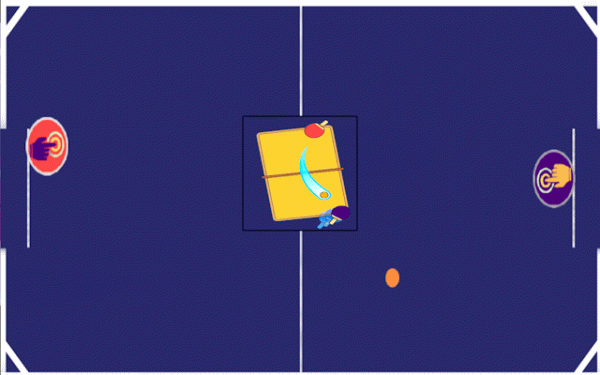
Ping Pong Arcade Sports Game strips table tennis down to its essentials: move your paddle, return the ball, and reach three points before your opponent. The minimalist visuals keep the ball easy to track, and the rising ball speed adds pressure without complicating the controls. Single Player mode offers a responsive computer opponent, while Two Player mode supports local competition on one device. Its short match length suits brief sessions, though players seeking deep customization or online play won't find it here.

About This Game

Match Rules and Scoring

Every round in Ping Pong Arcade Sports Game is a race to three points. That low threshold keeps individual matches short, so a single mistake doesn't doom a session. The ball accelerates as rallies stretch on, which means the longer you keep a point alive, the more your reflexes and positioning matter. Because the game resets quickly after a point, you can chain several matches together without waiting through long menus or animations.

Controls Across Devices

On a phone or tablet, you tap the left or right side of the screen to slide your paddle horizontally. On a computer, Player 1 uses the Q and D keys, while Player 2 uses the Left and Right Arrow keys. The control scheme is deliberately minimal: no spin buttons, no power meters, no angle modifiers. Your only job is to be in the right place at the right time and to aim your returns toward open space.

Solo and Local Two-Player Modes

Single Player mode puts you against a computer opponent that adjusts to how you play, so it won't simply repeat the same shot pattern forever. Two Player mode lets two people share one device, with each controlling a paddle from the same keyboard or touchscreen. That setup makes the game a natural fit for quick head-to-head sessions without needing a second device or an internet connection.

Reading the Ball and Improving

Because the visual style is clean and uncluttered, the ball and both paddles stay easy to track. The main skill you develop is anticipation: watching your opponent's paddle position and guessing where the ball will travel next. Quick, precise inputs matter more than long, sweeping movements. Playing against the computer can help you learn how the ball behaves at higher speeds, while local multiplayer gives you a live opponent whose habits you can read in real time.

Editorial Notes

Three-Point Match Design

Setting the win condition at three points is a deliberate pacing choice. It keeps individual matches short enough for a quick break while still allowing rallies to develop and ball speed to increase, which gives each point a natural difficulty curve.

Minimal Control Scheme

Restricting movement to left and right removes the need for shot-type buttons or angle controls. That simplicity lowers the entry barrier, but it also means skill expression comes almost entirely from timing, positioning, and reading where your opponent will be.

Local Multiplayer Focus

Two Player mode uses a shared device rather than networked play. This makes the game easy to set up for face-to-face matches, but it also means the multiplayer experience depends on having someone physically present to play with.

Adaptive Computer Opponent

The computer opponent is described as responsive and capable of adapting to your play. That suggests solo sessions won't feel like hitting against a static wall, though the exact extent of its adjustments isn't specified in the available information.

Compatibility

✅ This game supports:
- Desktop browsers (Chrome, Edge, Safari)
- Mobile browsers (Chrome on Android, Safari on iOS)
❌ Does NOT support: - Internet Explorer - Very old browser versions
👉 Try refreshing or updating your browser

Share:

System Requirements

OS Windows 7/8/10 64-bit
CPU Core i3 3.3 GHz
Memory 4GB RAM
GPU Intel HD 4000
CPU (Recommended) Core i5 3.5 GHz
Memory (Recommended) 8GB RAM
OS Mac OSX Mojave (10.14.6+)
CPU Core i3 3.3 GHz
Memory 4GB RAM
GPU Intel Iris Pro 5200
CPU (Recommended) Core i5 3.5 GHz
Memory (Recommended) 8GB RAM

Follow Us

Faq

How many points do you need to win a match in Ping Pong Arcade Sports Game?
A match ends when one player reaches three points. This keeps rounds brief and encourages aggressive, decisive play rather than long defensive exchanges. Because the ball speeds up during rallies, those three points can arrive quickly or stretch into tense back-and-forth sequences depending on how well both players return.
Can two people play Ping Pong Arcade Sports Game on the same device?
Yes. Two Player mode supports local multiplayer on a single device. On a computer, Player 1 uses the Q and D keys while Player 2 uses the Left and Right Arrow keys. On a touchscreen, each player taps their side of the screen. No internet connection or second device is required.
Does the computer opponent in Single Player mode get harder over time?
The computer opponent is described as responsive and adapts to your play. That means it reacts to how you position your paddle and where you aim your shots, rather than following a fixed script. The ball also accelerates as rallies continue, which raises the difficulty within a single point regardless of the opponent's behavior.
Is Ping Pong Arcade Sports Game suitable for beginners?
The controls are intentionally simple: tap a side of the screen or press one of two keys to move your paddle. There are no complex shot types or timing windows to memorize. Beginners can start playing immediately, though improving at higher ball speeds still requires practice in reading your opponent's positioning and reacting quickly.
What makes the ball speed up during a rally?
The game increases ball speed as a rally continues. Each successful return adds pace, so the longer a point lasts, the less time you have to react. This design rewards early aggression and consistent positioning, and it prevents rallies from becoming slow, endless exchanges that stall the match.
Does Ping Pong Arcade Sports Game require an internet connection?
No. Both Single Player mode against the computer and Two Player mode on the same device work without an internet connection. That makes the game usable during short breaks, while traveling, or anywhere you have your phone, tablet, or computer available.

Comments

0 comments
U
User
Please login to post a comment.
Loading comments...

Other Similar Games

Bridge Alignment Challenge
Action , Skill , Puzzle , Reflex , Arcade , Precision , Timing

Bridge Alignment Challenge

Bridge Alignment Challenge is a skill-based arcade game where players guide a moving bridge across platforms, adjusting its height or width to match gaps of different shapes without touching the edges. Each stage increases speed and gap complexity, demanding sharp timing and hand-eye coordination.

Play Now
Chicken Crossing Puzzle Adventure
Arcade , Puzzle , Timing , Family-Friendly , Casual , Traffic , Chicken

Chicken Crossing Puzzle Adventure

Chicken Crossing Puzzle Adventure is a casual arcade puzzle where players click or tap chickens to guide them safely across roads with moving traffic. Each level requires a set number of successful crossings, and timing plus observation drive progress.

Play Now
Twin Vehicle Action
Action , Arcade , Reflex , Multi-Tasking , Casual , Obstacle

Twin Vehicle Action

Twin Vehicle Action is a free online arcade game in which you steer two vehicles along separate lanes at the same time. Dodge obstacles with both, collect glowing items for points, and keep up as the pace steadily increases.

Play Now
Pixel Block Match Puzzle
Action , Puzzle , Arcade , Casual , Color Matching , Reflex , Online

Pixel Block Match Puzzle

Pixel Block Match Puzzle is a free online arcade game where you fire colored blocks at matching targets to clear the board. Build combos, keep the board from filling up, and adapt as the pace increases.

Play Now
Soccer League Champions
Sports , Arcade , Soccer , Multiplayer , Competition , Family

Soccer League Champions

Soccer League Champions is a free online arcade soccer game where you head the ball into the net, climb through distinct leagues, and improve your ladder ranking. Simple keyboard controls make it accessible for all ages.

Play Now
Present Collector Holiday Game
Arcade , Casual , Holiday , Family , Timing , Action

Present Collector Holiday Game

Present Collector Holiday Game is a free browser-based arcade game. Move a character left and right to catch falling holiday presents while avoiding similar-looking tricky items. You can miss up to ten gifts before the session ends.

Play Now
Pop Ball 87 Casual Arcade
Arcade , Casual , Family , Puzzle , Kids , Reaction

Pop Ball 87 Casual Arcade

Pop Ball 87 Casual Arcade challenges players to tap colorful balloons before they drift off screen. Each successful pop adds to the score, and the pace gradually increases, demanding quicker reactions. No downloads or complex rules—just accessible, family-friendly entertainment.

Play Now
Reboun.io
Action , Reflex , Arcade , Family-Friendly , Co-op , Duo Mode

Reboun.io

Reboun.io is an online arcade game that challenges your reflexes as you guide a ball from left to right, dodging obstacles and collecting food to level up. Duo and Co-op modes let you revive teammates by touching their green-tinted form within 10 seconds.

Play Now

HuntChef Hub

Quick Links

Home Skill Action Puzzle About

Usfull Links

Privacy Policy Terms Contact Us About Us Disclaimer

Stay Updated

Subscribe to our newsletter for the latest games and updates.

© 2026 HuntChef Hub. All rights reserved.

Share this page

Copy the link below to share this page: