Word Defender Typing Game
Reviews
Word Defender is a browser-based typing arcade game with a clear defensive objective: type the words on moving blocks before they reach the target. Its strength is the direct link between typing accuracy and survival, which makes practice feel purposeful. The speed level mode gives experienced typists a way to raise the pace, while the clean interface keeps attention on the words. It is best suited to desktop players who want free, no-download typing practice.
About This Game
Stopping Blocks by Typing
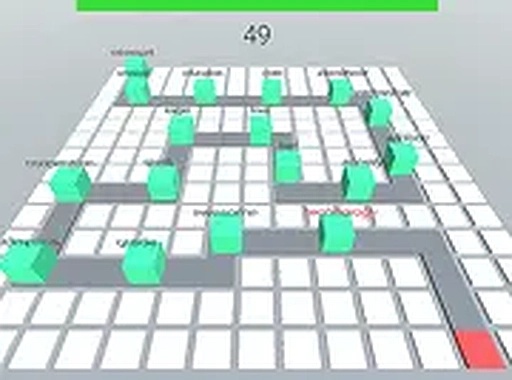
Word Defender turns typing practice into a defensive arcade task. Blocks carrying different words move through a maze toward a target block. You type the letters and full words shown on each block to remove it before it reaches the target. The objective is simple, but the pressure comes from moving objects rather than a static text prompt.
Reading, Aiming, and Typing Under Pressure
Each block displays a word, and you must type it correctly to clear that block. Immediate feedback tells you when a word is typed correctly or when you need to try again. Because blocks approach the target at the same time, you have to decide which word to type first and keep your eyes on the screen instead of the keyboard. Accuracy matters as much as speed; a mistyped word leaves the block in play.
Speed Level Mode and Rising Difficulty
The game includes a speed level mode for players who want a faster pace. As you progress, words may become longer or appear more frequently, requiring faster typing and better concentration. That progression is what separates a casual round from a genuine test of finger dexterity. Beginners can start at a comfortable pace, while experienced typists can use the speed level option to push their reaction time and accuracy.
Browser Access and Clean Presentation
Word Defender runs in a browser with no download required, and it is free to play. The clean interface keeps the focus on the words and the maze rather than on menus or extra features. It is designed for desktop computers with a keyboard for the best experience. The lack of unnecessary distractions makes it a practical environment for building muscle memory for common letter combinations and improving overall typing fluency.
Editorial Notes
Compatibility
System Requirements







Comments
0 comments