Artistic Anime Sketch and Color Studio

Artistic Anime Sketch and Color Studio

Publisher
Release Date
Update Time 2026-07-17
Tags Art , Drawing , Educational
Rating 4.0
Platform Html5
Advertisement

Reviews

This art studio stands out for its family-friendly approach and offline capability. The step-by-step lessons are well-structured for beginners, covering both characters and faces. The simple tools allow for creative coloring without frustration. It is a relaxing and educational experience that builds confidence in young artists. Highly recommended for parents seeking a wholesome creative outlet.

About This Game

Game Introduction

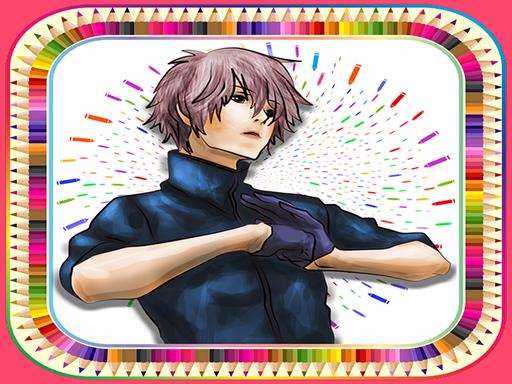
Artistic Anime Sketch and Color Studio is a free online art application that helps beginners learn to draw and color characters inspired by anime and manga art styles. The core objective is to provide a safe, family-friendly environment where users can develop their artistic skills through structured guidance. Unlike many other art games, this one focuses purely on creative expression without any violent or mature themes. It is designed for all ages and skill levels, making it an accessible tool for anyone interested in learning to draw. The game offers a variety of character templates, including female and male figures, as well as facial expressions common in anime art. Each lesson breaks down the drawing process into manageable steps, allowing users to progress at their own pace. The unique value of this game lies in its offline functionality, enabling practice anywhere without an internet connection. This makes it a reliable companion for travel or areas with limited connectivity. The interface is intuitive, with simple controls that even young children can understand. The game emphasizes gradual skill building, from basic shapes to more detailed features. It also encourages users to experiment with colors and personal style, fostering creativity. Overall, it is a wholesome educational tool that combines art instruction with entertainment.

How to Play

Players begin by selecting a character or face template from the available gallery. The game then presents a series of step-by-step visual instructions that guide the user through the drawing process. Typically, users start with basic outlines and gradually add details like eyes, hair, and clothing. After completing the sketch, players can use the coloring tools to fill in their artwork with various hues. The tools are designed to be simple, often just tap or click to apply color. Some lessons may include tips on shading or blending to enhance the final piece. The game does not require any prior drawing experience, as each step is clearly demonstrated. Users can pause, rewind, or repeat any lesson to ensure understanding. The interface is clean and uncluttered, focusing attention on the drawing area. Players can also save their completed works to a personal gallery for later viewing or sharing with family. The game encourages experimentation, so users can try different color combinations or modify the provided templates. There are no timers or scores, making the experience relaxed and pressure-free. The primary goal is to learn and enjoy the process of creating art.

Game Features

This game offers a collection of step-by-step drawing lessons that cover a range of anime-style characters and faces. All content is family-friendly and free from inappropriate material. The game works offline, so users can practice without needing an internet connection. It includes a variety of templates, such as female and male characters, as well as facial close-ups. The coloring tools are straightforward and easy to use, suitable for beginners. The interface is designed to be intuitive, with clear visual cues. The game may include a gallery feature where users can save and view their completed artwork. Lessons are structured to build skills gradually, from simple shapes to more complex details. The game does not contain any advertisements or in-app purchases that could distract from the learning experience. It is compatible with multiple devices, including tablets and smartphones, allowing for flexible use. The focus is entirely on creative expression and skill development, making it a safe choice for children and adults alike.

Tips for Success

To get the most out of this art studio, practice regularly to build muscle memory and confidence. Start with the simplest lessons and gradually move to more complex ones. Pay close attention to the step-by-step instructions and take your time with each stage. Experiment with different color combinations to develop your personal style. Do not be afraid to make mistakes; each attempt is a learning opportunity. Use the offline mode to practice in quiet environments where you can focus. Finally, share your creations with friends or family for encouragement and constructive feedback.

✅ Compatibility & Testing

• Desktop (Windows 11, macOS Ventura)
• Mobile (iPhone 14, Samsung Galaxy S23)
• Tablet (iPad Pro, Android tablet)
✅Supported browsers: Chrome, Safari, Edge, Firefox (latest versions)
❌ Not supported: Internet Explorer, older browser versions

System Requirements

OS Windows 7/8/10 64-bit
CPU Core i3 3.3 GHz
Memory 4GB RAM
GPU Intel HD 4000
CPU (Recommended) Core i5 3.5 GHz
Memory (Recommended) 8GB RAM
OS Mac OSX Mojave (10.14.6+)
CPU Core i3 3.3 GHz
Memory 4GB RAM
GPU Intel Iris Pro 5200
CPU (Recommended) Core i5 3.5 GHz
Memory (Recommended) 8GB RAM

Follow Us

Faq

Is this game suitable for young children?
Yes, the game is designed for all ages. The content is entirely family-friendly with no violent or mature themes. The simple controls and step-by-step lessons make it easy for young children to follow along and create their own artwork.
Do I need any special equipment to play?
No special equipment is required. The game works on most modern web browsers and mobile devices. A touch screen can be helpful for coloring, but a mouse or trackpad works just as well. The game is optimized for both desktop and tablet use.
Can I share my artwork with others?
The game may include a gallery feature that allows you to save your completed drawings. You can then share these images with friends or family through your device's standard sharing options. Always ensure you have permission before sharing online.
How many different characters can I learn to draw?
The game offers a variety of templates, including several female and male characters as well as facial expressions. The exact number may vary, but there are enough options to keep beginners engaged and challenged. New lessons may be added over time.
Does the game require an internet connection to work?
No, the game works offline once it has been loaded. This means you can practice drawing anywhere, even without Wi-Fi or mobile data. It is perfect for travel, long car rides, or areas with poor connectivity.
Are there any in-app purchases or ads in this game?
The game is free to play and does not contain any in-app purchases or advertisements. This ensures a distraction-free learning environment. All lessons and tools are available without any additional cost or interruptions.

Other Similar Games